
Opening an Existing Project
Opening a file created in The Print Shop 3.0
Any project created with The Print Shop 3.0 will have a thumbnail preview in the Project Gallery.
Opening a file created in The Print Shop 2.0
With one exception, The Print Shop 2.0 projects act and function exactly like The Print Shop 3.0 projects. When you initially open a Print Shop 2.0 project, you will want to import it into the Project Gallery.
- From the Project Gallery click on "Open an existing project".

- Click on the "Import" button in the Project Gallery.

- Browse to the location of your The Print Shop 2.0 project.
- Select your project by clicking on it once.
- Click on the Open button.
Note: If your projects are all in the same location you can import multiple projects at once by holding down the control key on your keyboard during step 4 and clicking on each project you would like to import.
Opening a file Created in Print Shop (versions 20 - 23.1) and PrintMaster (versions 16 - 18.1)
Older The Print Shop and PrintMaster files will also open inside The Print Shop 3.0. However, they will react differently than Print Shop 2.0 or 3.0 files. The older files will become rasterized. This means that some objects will become permanent parts of your project and cannot be edited. You can still add additional elements to your projects though and cover up things you don't want on your project.
To Open your older files:
- Click on the File Menu Tab.
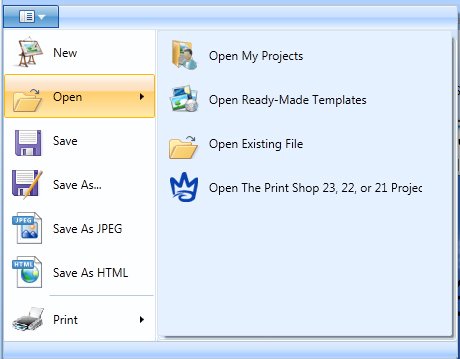
- Click on Open.
- Click on Open The Print Shop 23, 22, or 21 files.
- Browse to and Select your project file.
- Click on the Open button.
- It will take a minute or two to convert your old Project into a new The Print Shop 3.0 project. Please be patient with this process as your computer may seem unresponsive during the conversion process.
Note: Large project files from the old program may not convert. - Once your project is converted you can edit it using The Print Shop 3.0.
Note: The instructions above will also work for projects created in PrintMaster 16, 17, and 18. On Step 3 Click on Open PrintMaster 16, 17, or 18 files.